
Get Started
Here you'll find everything you need to get up and running with bootmod3. Follow our step-by-step instructions on how to activate, connect, and optimize your vehicle's performance.
How To Activate
Click for up to date instructions on the installation.
How To Connect
Learn the simple steps to connect your BMW to the bootmod3 app and start tuning your vehicle seamlessly.
FAQ
Find answers to the most commonly asked questions about bootmod3, from installation to troubleshooting and beyond.
How To Activate
bootmod3 takes less than 5 minutes to install on your vehicle. You will need the following:
- bootmod3 software license
- WiFi adapter
- Laptop with macOS or Windows, or bootmod3 app for iOS/Android smartphone
Website at www.bootmod3.net, or the mobile app, are two ways to interact with your bootmod3 account and get it all set up. The installation process is user-friendly, however, we have gone to great lengths to simplify the Setup Guide. Please see below for both laptop and mobile app configurations. Flashing the vehicle for the first time takes around 3 minutes and switching maps after takes just seconds to do. Complete https://bootmod3.atlassian.net/wiki/spaces/BCS/pages/461596/How+to+install+bootmod3+on+your+vehicle is quite lengthy but well worth the read. It explains all of the currently available features in detail and is available from https://bootmod3.atlassian.net/wiki/spaces/BCS/pages/2929819651/bootmod3+v3.0+User+Manual.
Option 1
Wireless Connection
Connecting a smartphone (iOS / Android) wirelessly to the vehicle via bootmod3 WiFi adapter - *recommended
Compatible with
#1
Purchase a bootmod3 WiFi Adapter
Purchase a bootmod3 WiFi OBD Adapter from an authorized dealer or from the bootmod3.com website.
#2
Purchase a bootmod3 Software License
Purchase a bootmod3 software license from any of our Authorized Dealers or on our website. An activation email is sent to you at the time of checkout with the activation key for your vehicle. One license per vehicle.
#3
Download bootmod3 app from the App / Play Store
bootmod3 is designed for flexibility, offering full compatibility with both iOS and Android devices.
#4
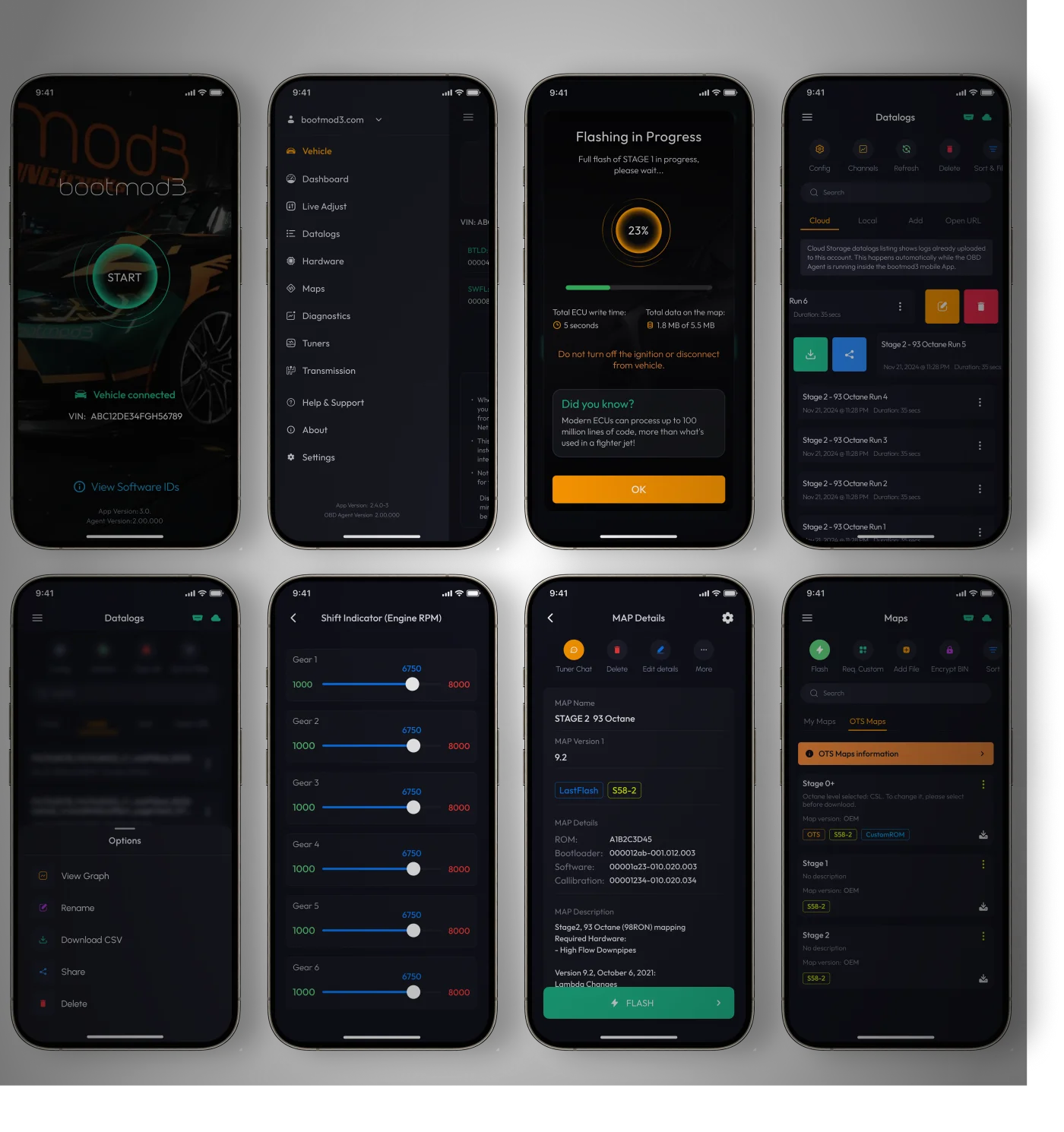
To register:
- Vehicle needs to be connected to phone/tablet via bootmod3 WiFi adapter
- Login screen will show your vehicle's VIN upon connection
- Click on Sign-up and register for an account on bootmod3.net
- You can use Facebook, Google and Apple logins instead of manually entering your email and password
- Once in the app, click on your VIN to activate and enter the activation key received in the email
- Click on the top left menu and click on 'Maps' and go to the OTS Maps tab
- Choose an OTS map that matches your vehicle's current modifications and octane - click on 'Get Tune'
- Click on the acquired OTS map showing on the …


Option 2
Wired Connection to Laptop
Connecting a laptop (macOS / Windows) directly to the vehicle using an ENET cable.
Compatible with
#1
Purchase a bootmod3 WiFi Adapter
Purchase a bootmod3 WiFi OBD Adapter from an authorized dealer or from the bootmod3.com website.
#2
OBD2 Ethernet Cable
Generic cable also used for OEM programming with factory software tools. Available on Amazon/eBay, $20-$30
#3
Ready to GO!
Proceed to http://www.bootmod3.net, register your vehicle and flash a tune!
#4
To Register:
OBD Agent software needs to be running on your laptop Your laptop needs to be connected using an OBD ENET cable to the vehicle's OBD port.
After registration, to flash a map:
- Click on the top left menu and click on 'OTS Maps'
- Choose on OTS map that matches your vehicle's current modifications and octane and click on 'Get Tune'
- Click on the acquired OTS map showing on the 'My Maps' screen and click the red 'FLASH' button
- Choose the first option in the menu, 'Flash Now'
Ready to Upgrade Your Ride?
Visit our YouTube Channel
Frequently Asked Questions
Find answers to the most commonly asked questions about bootmod3, from installation to troubleshooting and beyond.
What do I need from you to get this going?
How to install bootmod3 on your vehicle
Do you have a user manual?
bootmod3 User Manual
How do I reach Tech or Sales Support if I have an issue or need help?
Service Desk Portal
How does bootmod3 flash the car? Does it need the internet?
bootmod3 is a cloud-based tuning platform available as a native app on iOS, Android, macOS, and Windows. The app connects to our cloud servers to provide map editing, configuration, built-in custom tuning with tuners in our Tuner Directory, and seamless remote tuning collaboration without emailing files back and forth.
The Internet is required for:
- Downloading maps from the cloud
- Syncing map configurations
- Custom tuning requests with your tuner
- License activation and verification
Offline capability:
- Once a map is downloaded to your device, it can be flashed without an internet connection.
- The app stores maps locally, similar to how Spotify works with downloaded music.
- You can download your maps ahead of time and flash them later, even without connectivity.
Can I use bootmod3 with more than one car?
Do I need to remove my DME and send it to you to unlock for programming?
Do you have Authorized Dealer shops who can install this for me?
OBD adapter not detected error, how do I resolve this connectivity issue?
If you're seeing a connection or "VIN not detected" error, here are the troubleshooting steps:
- Check physical connection: Ensure the WiFi OBD adapter is fully seated in your vehicle's OBD-II port
- Verify ignition: Turn your ignition to the ON position (engine can be off)
- Check WiFi connection: Make sure your device is connected to the adapter's WiFi network
- Restart the connection: Close and reopen the bootmod3 app, then try connecting again
- Check for conflicts: Ensure no other devices are trying to connect to the adapter simultaneously
For detailed troubleshooting instructions, visit our support article:
OBD Adapter Not Detected / VIN not detected
I see the Stock Tune under My Maps. How do I get a tune (OTS map) to flash on my car?
To flash an OTS (Off-The-Shelf) map on your car:
- Go to the OTS Maps screen from the main navigation
- Browse available stages — Maps are organized by stage (Stage 1, Stage 2, etc.) with fuel type variants (91, 93, E30, E50, MultiMap)
- Select your desired map — Tap on the octane/fuel variant you want
- Acquire the map — If you haven't already, acquire the OTS map (some may require map credits)
- Download the map — Download it to your device for offline availability
- Flash — Connect to your vehicle and proceed with flashing
Your Stock Tune is automatically backed up under My Maps when you first activate your license. This ensures you can always return to factory settings.
Any DYNO numbers or results?
Can I run E85 or meth and do you have OTS maps for these?
How do I datalog and monitor how my car is doing?
Datalogging and real-time monitoring are built directly into the bootmod3 app. Here's how it works:
- Connect to your vehicle using the WiFi OBD adapter
- Open the Dashboard to view real-time gauges and data channels
- Start logging to record data for later analysis
The app supports:
- Customizable dashboard layouts with selectable data channels
- Auto-logging while driving
- Local storage of datalogs on your device
- Cloud sync for accessing logs across devices
Do I need a laptop or bootmod3 hardware device always plugged in?
- No. The bootmod3 app runs natively on iOS, Android, macOS, and Windows. You can flash, datalog, and tune directly from your phone or computer.
- The WiFi OBD adapter only needs to be plugged into your vehicle's OBD port when you're actively using bootmod3 features like flashing, datalogging, or diagnostics. For normal driving, nothing needs to remain connected.
What's the difference between bootmod3 and JB4?
- bootmod3 reprograms the vehicle's factory engine computer (DME) and in some cases other ECUs such as the transmission control unit (EGS/TCU).
- JB4 is a piggyback device. It is a boost controller with ability to run a methanol pump or secondary fuel injectors.
- TorqByte is another alternative as a meth controller, much more advanced and with finer control from the tuning point of view.
Can I tune my own car with bootmod3?
Will this void my warranty?
Can I re-sell or transfer my license?
Yes! bootmod3 is the only flash solution where your license can be transferred to a new VIN. This gives your license resale value that isn't available with other flash tunes.
Transfer requirements:
- The original vehicle must be flashed back to the Stock Tune
- The DME must be relocked using the bootmod3 app
- Transfer is restricted to the original license purchase—transferred licenses cannot be transferred again
- Previously purchased OTS maps and custom tunes are not transferable due to map data incompatibilities between vehicles
To initiate a transfer you can start the license transfer process directly in the bootmod3 app under your vehicle/license settings. You'll need:
- Your existing VIN
- The new VIN
- The new owner's email address (if transferring to another person)
For assistance, contact [email protected] with your original order number.
bootmod3 License transfer
Still have questions?
Can't find the answer you're looking for? Please chat to our friendly team.
Get in touch